Examples
The best way to learn the Agent is to talk to it. This page lists everything you can ask, grouped by what you're trying to do, with an example prompt for each. Leave the Agent on Auto and it picks the right capability for your request — or type / to choose one directly. Not sure where to start? Just ask "what can you do?"
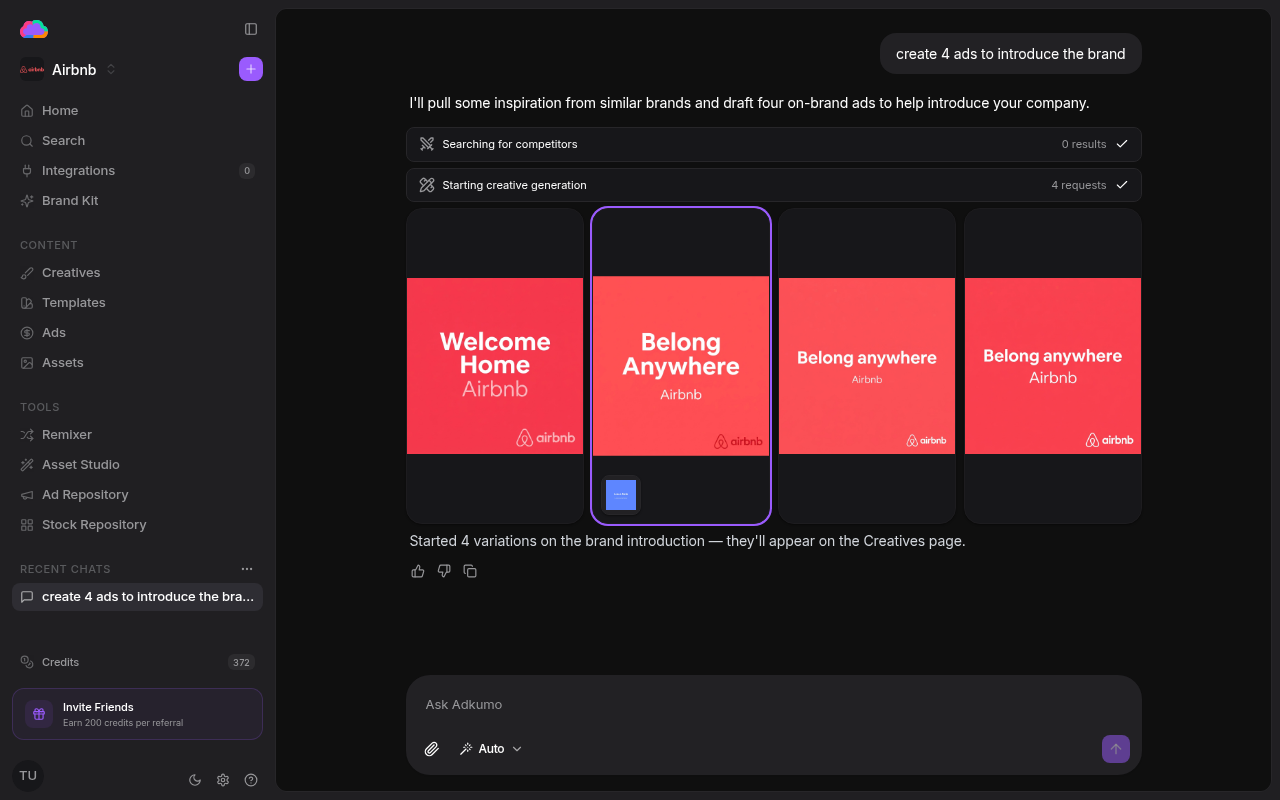
A request, end to end
Ask "create 4 ads to introduce the brand" and the Agent:
- Pulls inspiration from similar brands
- Kicks off creative generation — four variations in this case
- Confirms the work and points you to the Creatives page, where the results appear
Each step is shown inline so you can see exactly what the Agent did.
Create ads & images
New ad from a brief — describe the ad and the Agent designs an on-brand creative.
"Design an ad highlighting our fastest-onboarding-in-the-category angle."
Several ads at once — ask for a batch and you get distinct variations to choose from.
"Create 8 ads to launch our summer collection."
Ad from a template — start from a proven template layout and drop in your product.
"Use a SaaS dashboard template with our product screenshot."
Remix an existing ad — attach a reference ad and the Agent rebuilds it in your brand voice (the Remixer).
Attach an image, then: "Remix this in our brand voice."
Ad from your own assets — build a creative from product shots or images you've uploaded.
"Make an ad using our packaging photos from Assets."
Generate a standalone image — create a new image to use anywhere (the Assets library).
"Generate a warm, minimal product photo on a linen background."
Edit & refine
Edit an image or logo — clean up, restyle, remove a background, or tweak an uploaded image.
"Remove the background from this logo and make it crisp on dark backgrounds."
Edit an existing creative — change or remove elements on a creative you already made — headline, CTA, logo, background, colors.
"Change the headline on my latest creative to ‘Ships in 24h’ and drop the logo."
Write & rewrite copy
Write ad copy — on-brand headlines, taglines, hooks, or primary text, without generating a full creative.
"Write 10 punchy hooks for a retargeting campaign about cart abandoners."
Rewrite copy on-brand — paste any copy and get it reworded in your brand voice.
"Rewrite this caption to sound like us: ‘Buy now and save big!!!’"
Review & QA your ads
Review an ad before publishing — a pre-publish check across brand fit, platform policy, and accessibility.
"Review this ad before I publish it to Meta."
Ad-quality report — a synthesized quality read across your running ads, with what's strongest and what to fix.
"Give me a quality report on my running ads."
Ask about your brand & account
Your brand profile & voice — what the Agent knows about your brand.
"What's our brand voice and positioning?"
Audit my brand kit — what's defined vs missing across voice, visuals, assets, knowledge, and competitors.
"Audit my brand kit — what's missing?"
Brand overview & stats — a snapshot of your brand's activity.
"Give me an overview of this brand."
Your logos — see the logos on file for the brand.
"Show me our logos."
Your creatives — list the ad creatives you've generated.
"List my recent creatives."
Your published ads — see what you've pushed live across platforms.
"What ads have I published?"
Your assets — browse the images in your library.
"Show me my uploaded assets."
Your documents & knowledge — find files and brand facts you've saved.
"What documents do we have about our pricing?"
Credits, referrals & invoices — check your account.
"How many credits do I have left?" · "What's my referral link?" · "Show my recent invoices."
Connected ad platforms — see which ad accounts are linked.
"Which ad platforms are connected to this brand?"
Research & competitors
Quick fact lookup — a fast, grounded answer from the web.
"What's the average Meta CPM for skincare right now?"
Deep research report — a multi-step investigation that returns a structured report.
"Research the market and summarize the top three positioning angles."
Find your competitors — surface brands you compete with.
"Who are our main competitors?"
Browse a competitor's ads — see what a rival is actually running, from the ad library.
"Show me the ads Acme is running right now."
Competitor scan — a focused sweep of competitor ads and the angles that work in your vertical.
"Run a competitor scan for our category."
What customers say about a competitor — distilled review themes you can lean into.
"What do customers complain about with Acme?"
Search the ad inspiration library — find proven ads to learn from or remix.
"Find pricing-focused ads from B2B SaaS brands."
Find stock photos — search for usable photography.
"Find bright lifestyle photos of people cooking."
Search the help docs — get answers about using Adkumo itself.
"How do I connect my Meta account?"
Audience & personas
Build an audience persona / ICP — a researched ideal-customer brief to aim your campaigns at.
"Who should we target? Build an ICP for this brand."
Measure & analyze performance
Ask about your live campaigns and the Agent reads your synced performance and advises — it never changes your account.
How are my campaigns doing — a cross-platform performance read.
"How are my campaigns doing this month?"
Where am I wasting spend — find inefficient or zero-converting spend.
"Where am I wasting money on ads?"
What to scale — find your most efficient campaigns to put more behind.
"Which campaigns should I put more budget into?"
What to pause — surface underperformers.
"What should I pause?"
Keyword performance — which search terms to keep or drop.
"Which keywords should I drop?"
Specific metrics — ask for a number or a ranking.
"What's my CPA on Meta?" · "What are my best and worst ads?"
Weekly recap — what shipped, what's in flight, and what's lagging.
"Give me a weekly recap."
Manage live ads (Meta, LinkedIn & Google)
Operate on your connected ad accounts. New ads are always created paused for you to review before they spend.
List your ad accounts — see the accounts you can publish to.
"List my Meta ad accounts."
What's running — your live campaigns and ads on a platform.
"Which LinkedIn campaigns are running right now?" · "What Meta ads are live?"
Delivery status — whether a published ad is delivering.
"Is my latest ad delivering yet?"
Performance for one campaign or ad — drill into a single line.
"How is my Meta campaign for the summer sale performing?"
Google keyword planning — get recommended keywords for an ad.
"Plan keywords for a campaign about project-management software."
Google keyword research — a broader, ranked keyword set to explore.
"Research keywords for our category, including longtail terms."
Launch a Google Search campaign — turn researched keywords into a paused Search campaign.
"Launch a paused Search campaign with these keywords."
Launch by objective
Publish a creative to a platform optimized for a specific goal — always as a paused campaign you review first.
Meta — by objective — sales, leads, traffic, awareness, or engagement.
"Launch my latest creative to Meta optimized for sales." · "Publish this to Meta as a lead-gen campaign."
LinkedIn — image or spotlight — a standard image ad or a dynamic Spotlight ad.
"Publish this to LinkedIn as a Spotlight ad." · "Launch my creative as a LinkedIn image ad."
Google — Search, Display, PMax, or Demand Gen — pick the campaign type.
"Launch a paused Google PMax campaign with my latest creative." · "Set up a Google Display campaign."
Launch several creatives as one campaign — bundle multiple creatives into a single paused campaign.
"Launch creatives A, B and C together as one Meta campaign."
Plan new campaigns
Ask the Agent which new campaigns to run next and it proposes the highest-leverage ones, grounded in your brand and what's already live. It may ask a couple of quick multiple-choice questions (goal, platform, budget) to tailor the plan.
Which campaign should I run next — a grounded recommendation.
"Which campaign should I run next for this brand?"
Where to start / a full plan — a starting strategy when you're new to ads.
"We just started running ads — what should we run?" · "Give me a campaign plan for next quarter."
Win customers from a competitor — a conquest angle grounded in a named rival.
"How do we win customers from Acme?"
Turn a recommendation into a draft — once you accept a proposal, it can prepare a paused draft to review.
"Set up the retargeting one as a draft."
Update your brand
Update your brand voice — adjust the tone and style the Agent uses.
"Make our voice more playful and less formal."
Update brand-profile details — refine what the Agent knows about you.
"Add that we now ship to the EU."
Tackle bigger tasks
Plan a multi-step request — for a larger ask, the Agent can scope a plan before it acts, so you can see the steps first.
"Plan a full launch: research, three ad concepts, and a publishing checklist."
Pick a capability directly — type / in the message box to choose any capability above without describing it.
Type
/→ pick "Review an ad".
Rate each answer with the thumbs up / down controls — your feedback helps the Agent produce more on-brand results over time. Attach a reference image to any message to use it as context, and keep working while generation finishes in the background.